Building an AI-powered markdown knowledge base system for your engineering team
large
by Rany ElHousieny
Why I built this system
After managing a team building a complex API Gateway and Developer Portal (1,200+ APIs across 6 acquired tech stacks), I ran into a problem that I suspect every engineering manager faces: institutional knowledge was scattered everywhere. Meeting notes in one place, architecture decisions in another, sprint data in JIRA, credential docs in a wiki, and the real decisions lived in people’s heads.
When a new developer joined the team, onboarding took weeks. When I needed to answer a leadership question about our progress, I had to dig through 10 different sources. When the AI coding assistant tried to help, it hallucinated because it had no grounded context.
So I built a system that solved all three problems at once. This article walks you through how I did it and how you can do the same for your team.
The architecture: three layers
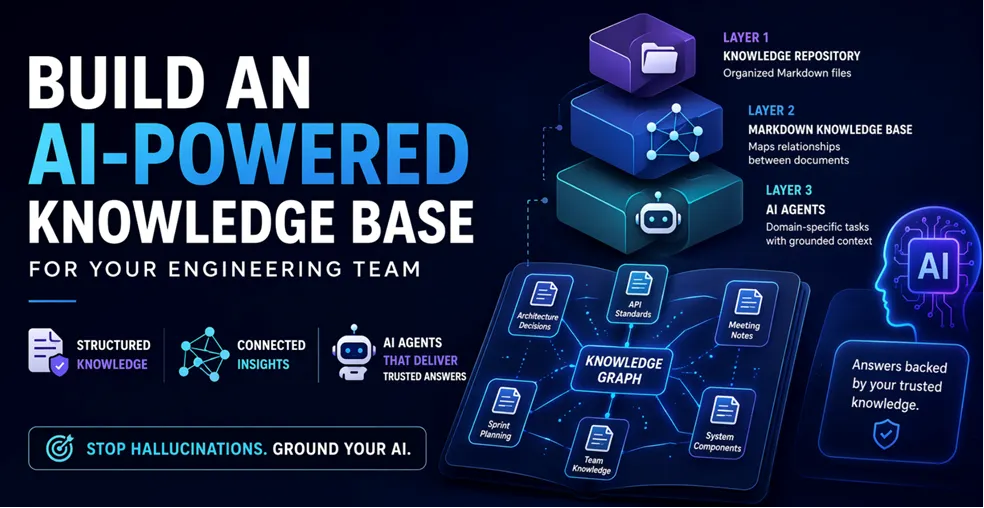
The system has three layers that build on each other:
Layer 1: Knowledge Repository – A structured directory of markdown files organized by authority level and topic.
Layer 2: Markdown Knowledge Base – A single markdown file that maps relationships between all documents, making the entire knowledge base navigable by both humans and AI agents.
Layer 3: AI Agents – Specialized agents that consume the knowledge base and perform domain-specific tasks with grounded, evidence-based responses.
Let me walk through each layer with real examples from the system I built.
Layer 1: The knowledge repository
Directory structure
The foundation is a well-organized directory of markdown files. Here is the structure I use:
Not all documents are equal. I organize them into tiers:
Tier 1: Source of Truth – Leadership-approved documents that define the project’s direction. These are read-only for AI agents. Examples: team kickoff notes, scorecards, VP directives, architecture decisions. If an AI agent contradicts a Tier 1 document, the agent is wrong.
Enforcement happens at three points: (1) each agent’s session initialization forces it to read Source of Truth files first, (2) the rules file (CLAUDE.md) instructs agents to cite Tier 1 files with file:line evidence for any authoritative claim, and (3) the user verifies answers by clicking through to the citation. When cited evidence doesn’t support the claim — or when it contradicts a Tier 1 file the user knows — the user catches it. The tier system converts silent hallucination into a visible, citable mismatch that a reviewer can spot.
Tier 2: Core Knowledge – Foundational technical documents that explain the system’s components. Examples: API gateway strategy, identity layer design, MCP server architecture. These are the “textbook” for your project.
Tier 3: Implementation & Analysis – Sprint planning files, meeting notes, generated reports. These are working documents that change frequently.
Tier 4: Historical/Archive – Old documents kept for reference. Explicitly marked as non-authoritative to prevent AI agents from citing outdated information.
Practical tips for layer 1
Use numbered prefixes for core knowledge files (00_, 01_, 02_). This gives a natural reading order for new team members.
Always include a md at the root. This is the single entry point for both humans and AI agents. It should contain: project overview, team roster, current sprint, critical context, and pointers to deeper documents.
Store meeting notes in meetings/ with date prefixes like 2026-03-15_Topic_Summary.md. This makes them searchable and chronological.
Never delete outdated documents — archive them, and update the Knowledge Base. Move superseded docs to archive/, add a one-line banner at the top marking them non-authoritative, and remove their entries from active concept clusters in the Knowledge Base. Because agents read the Knowledge Base first and only follow its links, archived files become invisible to them. Build this archive step into your post-meeting and post-decision workflows from day one — a stale knowledge layer is worse than no layer at all, because it masquerades as ground truth.
Keep everything in markdown. It is version-controlled, diff-friendly, AI-readable, and renders well in GitLab/GitHub.
Layer 2: The markdown knowledge base
This is the part that ties everything together. The Knowledge Base is a single markdown file (Knowledge/KNOWLEDGE_BASE.md) that maps relationships between all documents in the knowledge base.
What the knowledge base contains
Document hierarchy – Which files exist at each tier, with one-line descriptions
Relationship mappings – How documents connect to each other (e.g., “gateway strategy depends on IAM design”)
Concept clusters – Groups of documents around specific topics (e.g., “Authentication & Credentials” cluster includes 6 files across 3 directories)
Evidence trails – Where specific claims or decisions are documented
Navigation paths – Suggested reading order for different use cases (onboarding, deep-dive, decision-making)
Mermaid diagrams – Visual representation of document relationships
Example knowledge base structure
# Project Knowledge Base
## Document Hierarchy & Authority
### Tier 1: Source of Truth (READ ONLY)
Source of Truth/
|– team_kickoff.md [PRIMARY – Vision, roadmap, team structure]
|– scorecard.md [CRITICAL – Success metrics & milestones]
|– vp_directive.md [CRITICAL – Priorities & ownership]
When an AI agent receives a question like “What is our authentication strategy?”, it:
Reads the Knowledge Base first
Finds the “Authentication & Credentials” concept cluster
Reads the listed files in priority order (Tier 1 first)
Answers with citations to specific files and line numbers
Without the Knowledge Base, the AI agent would have to search every file in the repo, likely miss important context, and potentially hallucinate based on outdated files in the archive.
Maintaining the knowledge base
The Knowledge Base needs to stay current. I use two mechanisms:
Automatic maintenance triggers – After meetings, run a workflow that updates the Knowledge Base. After adding new documents, update the entry. The file md defines the rules for AI agents.
Post-meeting update workflow – After any significant meeting or decision, run a workflow that updates the Knowledge Base, START_HERE.md, and relevant agent prompts. This keeps the entire system in sync.
Layer 3: AI agents
This is where the system becomes powerful. Each AI agent is a specialized prompt that consumes the Knowledge Base and performs domain-specific work.
Agent architecture
I follow a single source of truth architecture for agents:
The rule is simple: only edit the source prompts. The workflow wrappers and skills are thin pointers. This prevents content drift between multiple copies of agent instructions.
Anatomy of an agent prompt
Every agent prompt follows this structure:
# Agent Name
## Role
One paragraph defining what this agent does.
## Session Initialization (MANDATORY)
1. Read START_HERE.md
2. Read Knowledge/KNOWLEDGE_BASE.md
3. Check Generated/PROGRESS_TRACKER.md
4. Read relevant Source of Truth files
## Core Capabilities
– Capability 1 with specific instructions
– Capability 2 with specific instructions
## Rules
– Evidence-based responses only (cite file:line)
– Mark confidence levels (HIGH/MEDIUM/LOW)
– Never speculate about system behavior
– Follow the authority hierarchy (Tier 1 overrides Tier 2)
## Knowledge Sources
(list of files this agent should read)
## Tools Available
(list of tools/scripts this agent can use)
Example agents I built
Here are some of the agents in the system and what they do:
Developer Agent – Writes code, implements features, follows the project’s coding standards. Knows the repo structure, CI/CD pipeline, and testing patterns.
Scrum Master Agent – Manages sprint ceremonies, creates JIRA tickets, tracks velocity, generates sprint review decks. Fetches live data from JIRA APIs.
Security Engineer Agent – Reviews code for security issues, knows the IAM integration patterns, validates authentication flows.
Gateway Expert Agent – Deep specialist in the API Gateway infrastructure. Knows Terraform configs, Nginx routing rules, OpenAPI specs, and service onboarding procedures.
Service Learning Agent – Onboards new service domains. Clones a repo, analyzes it, generates a Knowledge Base and an AI Agent for that service.
Workflows: making agents actionable
Agents become truly useful when wrapped in workflows that developers can invoke with slash commands:
—
description: Generate sprint review slides from JIRA data
—
# /sprint-review-slides
## Step 1: Fetch data from JIRA
(automated script that pulls velocity, tickets, accomplishments)
## Step 2: Update the generator script
(copy from previous sprint, update SPRINT dictionary)
## Step 3: Generate the deck
python3 Planning/Q2_Sprint_N/generate_sprint_review.py
## Step 4: Verify output
(check the generated .pptx file)
A developer types /sprint-review-slides and the agent handles everything: fetching JIRA data, generating PowerPoint slides, and saving the output.
Key workflows I use daily
/sprint-review-slides – Generates sprint review decks from live JIRA data
/review-sprint-before-start – Analyzes velocity trends before committing to a sprint
/sprint-planning-complete – Creates epics, stories, assigns points, syncs to JIRA
/code-review – Reviews merge requests with architecture context
/create-feature-branch – Creates branches from JIRA tickets with proper naming
/commit-push-create-mr – Commits, pushes, and creates GitLab merge requests
How to build this for your team
Step 1: start with START_HERE.md
Create a single entry point file that answers these questions:
What is this project?
Who is on the team?
What sprint are we in?
What are the key architecture decisions?
Where do I find credentials and access?
This file should be readable in under 5 minutes and give someone enough context to start contributing.
Step 2: organize your knowledge
Take your existing documents (wiki pages, design docs, meeting notes) and organize them into the tiered structure:
Move your most important documents into Source of Truth/. Convert wiki pages to markdown. Date-prefix your meeting notes.
Step 3: build the knowledge base
Create Knowledge/KNOWLEDGE_BASE.md with:
1. A list of every document organized by tier
2. One-line descriptions for each file
3. Concept clusters grouping related files
4. A Mermaid diagram showing relationships
Start simple. You do not need to map every relationship on day one. The Knowledge Base grows organically as you add documents and discover connections.
Step 4: create your first agent
Pick the task your team does most often (probably sprint planning or code review) and create an agent for it:
1. Write the agent prompt in prompts/templates/AI Agents/MY_AGENT.md
2. Create a slash command in .claude/commands/my-agent.md
3. Test it by invoking the slash command
4. Iterate based on what the agent gets wrong
Step 5: add rules
Create CLAUDE.md (or .claude/rules.md, or the equivalent rules file for your AI tool) with rules like:
Always read the Knowledge Base before answering questions
Cite sources with file:line format
Never contradict Source of Truth documents
Mark confidence levels on claims
Do not hallucinate — say “I don’t know” when unsure
Rules are what turn a generic AI assistant into a grounded team member.
Step 6: automate maintenance
Create workflows for keeping the system current:
Post-meeting workflow — After meetings, update Knowledge Base and START_HERE
Session context workflow — Logs what was accomplished for continuity across sessions
Real results
After running this system for several months with a team of 5 developers:
Onboarding time dropped from weeks to hours. New developers read START_HERE.md and the Knowledge Base, then the agent answers their questions with cited sources.
Sprint review prep went from 2 hours to 5 minutes. The /sprint-review-slides workflow pulls live data from JIRA and generates the entire PowerPoint deck.
Decision traceability improved dramatically. Every architecture decision is documented, cited in the Knowledge Base, and available to every agent. No more “I think we decided X in that meeting last month.”
AI agent accuracy improved significantly. With the Knowledge Base providing grounded context, agents stopped hallucinating about system behavior and started citing real evidence.
Common mistakes to avoid
1. Do not try to document everything at once. Start with Source of Truth and the 5 most important knowledge files. Grow from there.
2. Do not skip the authority hierarchy. Without tiers, AI agents treat a random meeting note with the same weight as a VP directive. That leads to bad answers.
3. Do not let the Knowledge Base go stale. Build the maintenance habit into your workflows. If the Knowledge Base is outdated, AI agents make outdated recommendations.
4. Do not duplicate content across agent prompts. Use a single source of truth for each agent definition. Wrappers should be thin pointers, not copies.
5. Do not forget the rules file. Without rules, AI agents default to generic behavior. Rules are what make them follow your team’s standards.
Getting started today
The simplest starting point is three files:
1. START_HERE.md – Your project’s entry point
2. Knowledge/KNOWLEDGE_BASE.md – Document map with tiers and relationships
3. AGENTS.md – Instructions for AI agents entering your workspace
From there, add knowledge files as you go, build agents for repetitive tasks, and create workflows for your most common operations. The system compounds over time — every document you add makes every agent smarter.
Rany ElHousieny is an Engineering Leader at Clearwater Analytics with over 30 years of experience in software development, machine learning, and artificial intelligence. He has held leadership roles at Microsoft for two decades, where he led the NLP team at Microsoft Research and Azure AI, contributing to advancements in AI technologies. At Clearwater, Rany continues to leverage his extensive background to drive innovation in AI, helping teams solve complex challenges while maintaining a collaborative approach to leadership and problem-solving.
Most compliance breaches aren’t discovered at order entry. They’re discovered at end of day after settlement, or during a client or auditor’s operational due diligence review. For firms without effective portfolio compliance, every order sent is a potential liability that hasn’t been validated yet. Here’s what makes that frustrating: pre-trade compliance is one of the most effective risk mitigation tools in investment management. The technology exists. The…
The stealth risks building inside APAC insurance portfolios are not inevitable. They are the predictable result of growing faster than the infrastructure can support, and they are addressable for firms willing to treat operational capability as a strategic priority rather than an administrative one.
TSAM London returned to the Business Design Centre on April 13-14, bringing together senior buy-side leaders for two days of conversation on the forces reshaping asset management.